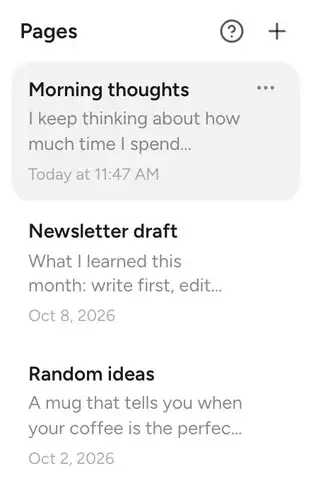
A brain dump app lets you get everything out of your head first and decide what it is later. BrainDump opens to a blank page, then helps you sort, find and act on what you wrote.
Same text on a screen. A very different first ten seconds.
| Compare | Brain dump app | Regular notes app |
|---|---|---|
| First thing you see | A blank page, cursor ready | A list, a dashboard or a folder tree |
| Before you can type | Nothing | A title, a folder, sometimes a template |
| Organizing | Later, or never. AI can do it for you | Up front, by you |
| Finding things again | Ask a question, old pages come back | Remember where you filed it |
| Best for | Racing thoughts, ideas, worries, to-dos in one go | Reference docs and wikis |
The whole app is one habit in three steps.


Open BrainDump and type, or talk. Freewrite pages need no title. The widget, Siri and the Mac menu bar get you there in one tap.


Turn a page into a to-do list, an email or a summary. Untangle files a messy folder into named subfolders. Every change waits for your OK.


Ask your notes a question and get the answer with its sources. Nimbo brings back one old page a day, so ideas don't get buried.
A notes app built for getting everything out of your head first and organizing later. It opens straight to a page you can type on, without asking for a title, folder or template.
Those are built for storing and organizing. A brain dump app is built for capture: no decisions before you type, and tools that sort the pile afterwards. Many people use both.
Yes. Writing, Freewrite, folders, search and iCloud sync stay free forever. AI comes with a free monthly allowance, and Focus makes it unlimited, including Untangle.
It's built around how ADHD brains capture things: fast, messy, and without deciding where it goes first. It isn't medical software.
Native apps for iPhone, iPad, Mac, Vision Pro and Windows, plus a web app for any browser, including Android, Linux and ChromeOS.
Every note is private until you share it, and your notes are never used to train AI models. See privacy and security for the details.
More on how your notes are handled: privacy and security.

Open it and type. No folders, no titles, no setup. Sort it later, or let AI do it.
Start writing freeFree in your browser. Also on iPhone, iPad, Mac and Windows.